
Facebook Reset / Privacy and safety
Privacy and safety
Your Facebook lists, words and history stay in this browser, and Facebook Reset never asks for your password. Here is what leaves it, and how cleanup stays safe.
What stays in this browser
Your lists, selections, Keep marks, words, mutes, hidden-post records, settings and History. In Settings you can download all of it as one JSON file, or delete it and keep your license.
What leaves it
| Where | What | Kept for |
|---|---|---|
| Gumroad | Your payment, and the license key on your receipt. | Gumroad's own policy |
| Activation service, on Cloudflare | License key, checkout session, sale and product IDs, and activation status. For verified sales, also dates, amounts, fees and refund status. | Checkout records 30 days; sale and license records 400 days |
| Health reports, after you click OK | Once a day: the date, the version, Facebook's language, Free or Pro, about how long it has been installed, whether Feed and tracking blocking are on, and counts in ranges: panel opens, posts checked and hidden by kind, Feed errors, runs started and why they stopped, changes made, failed or unconfirmed, the rating request, checkout and Pro activation, Facebook Reset's own errors and Facebook's error numbers. A new random ID for each report. Never Facebook names, lists, posts, words, links, your account, email addresses or keys. | The report's ID 7 days on Cloudflare, to drop a repeat; up to 12 months in PostHog |
| This website | Page views, clicks to the store or Gumroad, scroll depth, load time and errors, with the campaign and referring site, a random session ID, and a 30-minute source cookie. No query strings. | Up to 12 months in PostHog |
Turn health reports off in Settings to stop counting and sending. Nothing is counted before you click OK, and nothing from before OK is sent. A report carries no ID that ties it to you or to another report, so it cannot be looked up or deleted one by one. Versions up to 0.10.0 sent usage counts only if you turned them on; for those, email me the rough date and version. We never receive your card number or your Facebook password. The details are in the site privacy policy.
The Privacy switches
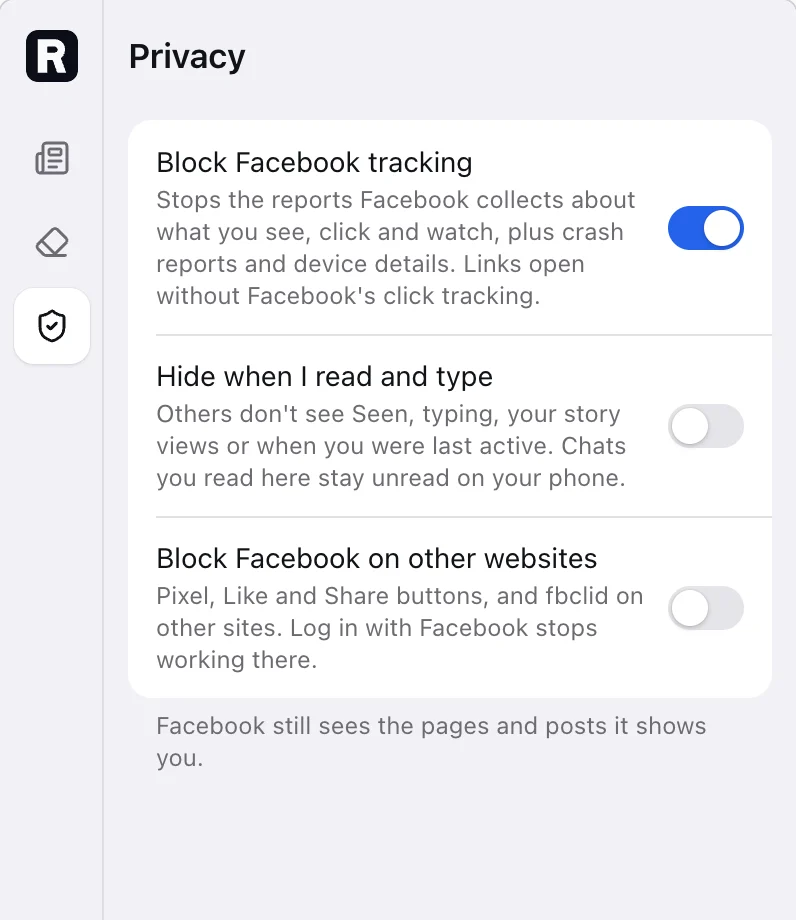
- Block Facebook tracking, on from install: stops Facebook's reports on what you see, click and watch, its crash reports and detailed device details. Links open directly, without Facebook's click tracking or its check for unsafe links.
- Hide when I read and type, off until you turn it on: hides Seen, typing, story views and last active. Chats you read here stay unread on your phone.
- Block Facebook on other websites, off until you turn it on: blocks the Facebook Pixel, Like and Share buttons, and the fbclid tag. Chrome asks for access to all sites first, and Log in with Facebook stops working on those sites.
The switches work inside Chrome and send nothing to us. Facebook still sees the pages and posts it shows you, and ads still load before they are hidden.
Safety
- Loading a list changes nothing. Nothing changes on Facebook until you select items and confirm.
- Changes run one at a time, and you can pause or stop between them.
- Each change is checked on Facebook. Anything unconfirmed waits under Check on Facebook and is never retried on its own.
- Nothing is sent while Facebook shows a login or security page. A run pauses after 200 changes in an hour, on Free and Pro, and stops after five failures in a row or at a security check or limit from Facebook.
- No tool can promise how Facebook treats your account. Start with a few items, and stop if Facebook warns you.
Questions
What is each Chrome permission for?
- Facebook pages: hide posts, load your lists when you press Load, make the changes you confirm, and block tracking reports.
- Side panel: show the panel next to Facebook.
- Storage: keep your settings, lists and History on this device.
- Tabs: follow the Facebook tab you are on, and open Facebook, help or checkout when you ask. It does not collect your browsing history.
- Scripting: run its own packaged code on Facebook pages. It never runs downloaded code.
- Network rules: block Facebook's tracking reports inside Chrome. No request content is read or sent.
- Alarms: close the short-lived Facebook tab it uses while loading a list, after about 90 seconds.
- Gumroad and the activation service: check Pro keys.
- All sites, optional: only for Block Facebook on other websites.
Is it affiliated with Meta?
No. One person builds and looks after it. It is not affiliated with, endorsed by, or sponsored by Meta or Facebook.