
Facebook Reset / Feed
Hide Facebook ads, suggested posts and Reels in Chrome
Install Facebook Reset, open Facebook in Chrome, and ads, suggested posts and Reels disappear as Facebook loads them. It's free with no limit, and hiding never unfollows or unfriends anyone.
A calmer Home page
Pick one of three layouts. Clean, the default, removes the side menus, Stories, the post box, the New message button, and the Reels, Marketplace and Gaming tabs. Focus is Clean in one wide column without like and comment counts. The Facebook layout leaves the page as it is.
To spend less time on Facebook, set a daily limit of 30 minutes, 1 hour or 2 hours, or pause the Feed for an hour.
One menu on every post
One button replaces Facebook's ⋯ and ✕. Hide the post, mute who posted it for 1, 7 or 30 days or always, hide posts like it, or highlight the person or Page. Most actions show an Undo. Unfollow on Facebook, in the same menu, is a real change.
See what was hidden
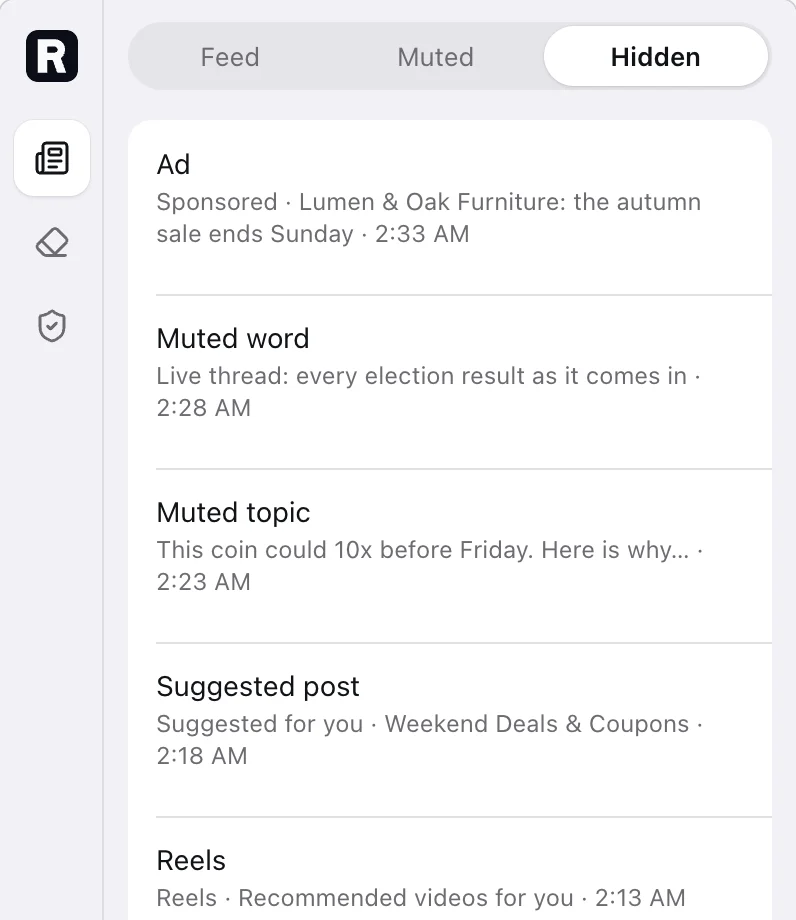
Hidden lists up to 500 posts from the past 30 days, with the reason for each. Show a post that's still on the page, or stop hiding what matched.
What Pro adds
Five more filters: AI-labelled posts, engagement bait, duplicate posts, repeated reshares, and Comment Shield, which checks the comments under a post too. Pro costs $19 once.
Questions
How do I hide ads on Facebook in Chrome?
Install Facebook Reset and open Facebook in Chrome on your computer. Ads in the Feed, down the side and in the Reels strip are removed as Facebook loads them. It's on from install, free, and has no limit. To keep one advertiser out for good, choose Always hide this advertiser in the menu on its post.
How do I stop seeing suggested posts, Reels and People You May Know?
While Facebook Reset is on, Suggested for you, suggested Pages and groups, People You May Know and Reels are hidden. Turn off Hide Reels if you want Reels back. Suggestions and People You May Know are recognised when Facebook is set to English, Vietnamese, Spanish, Portuguese, French, German, Indonesian, Swedish, Italian or Bengali.
Can my Feed show only people, Pages and groups I follow?
Yes. Only people, Pages and groups I follow is on for new installs. It hides posts from accounts you don't follow and groups you haven't joined. It changes only what this browser shows and never unfollows anyone.
Can I mute words or topics on Facebook?
Yes. In Feed › Muted, type a word, #hashtag or site, or tap a ready-made topic, then choose 1 day, 7 days, 30 days or Always. A post hidden by your words leaves a small marker with Show and Stop hiding. You can save up to 500 words and mutes. Free runs 3 of your words or topics at a time; Pro runs all of them and can match your own topics by meaning on a Chrome with the built-in model. Muting a person or Page is free and doesn't count toward the three.
Does it block Facebook tracking?
Yes. Block Facebook tracking is on from install. It stops the reports Facebook collects about what you see, click and watch, plus crash reports and device details, and links open without Facebook's click tracking. Ads are hidden, not blocked, so they still load. Facebook still sees the pages and posts it shows you.
Does my Facebook content leave my browser?
No. Your words, mutes and hidden-post records stay in this browser. Matching topics by meaning runs on Chrome's built-in model on your computer. Anonymous health reports are sent only after you click OK, and they never include anything from Facebook.